Artemis Weapons Panel
A custom-built Weapons control panel for Artemis Starship Bridge Simulator.
Overview
I started with a vague idea that I wanted a control panel for the weapons console. I mapped out the panel to figure out how many buttons, leds switches etc I would need. The box is a wedge shape and 3d printed. This allows scope for adjustment and changes for other panels that might need more space. I'm considering testing out a touch panel styled like LCARS so watch this space for that one.
Technical Details
Heres the arduino code i used to run the controls, as well as connecting to the pc as a HID via bluetooth and sending button presses as keyboard strokes. I did need to remap some keyboard controls to make it work.
#include

// ---------------- PIN MAP ----------------

// Shield switch
const int shieldPin = 15;

// LEDs (1 shield + 8 rotary)
const int ledPins[9] = {
  16,17,18,19,21,22,23,25,2
};

// Rotary selector (8 inputs)
const int rotaryPins[8] = {
  27,32,33,34,35,39,36,4
};

// Buttons (6)
const int buttonPins[6] = {
  5,3,14,26,12,13
};

// ---------------- DEBOUNCE SETTINGS ----------------
const unsigned long debounceDelay = 25; // ms

// State tracking
int lastShieldStable = HIGH;
unsigned long shieldLastChange = 0;

int lastButtonStable[6];
unsigned long buttonLastChange[6];

int lastRotaryStable[8];
unsigned long rotaryLastChange[8];

void setup() {
  Serial.begin(115200);
  delay(500);

  Serial.println("Artemis Weapons Panel Booting...");
  Serial.println("Bluetooth HID active");
  Serial.println("------------------------------");


  Keyboard.deviceName = "Artemis Weapons";
  Keyboard.deviceManufacturer = "Spartacus";
  Keyboard.begin();


  pinMode(shieldPin, INPUT_PULLUP);

  for (int i=0; i<9; i++) {
    pinMode(ledPins[i], OUTPUT);
    digitalWrite(ledPins[i], LOW);
  }

  for (int i=0; i<8; i++) {
    pinMode(rotaryPins[i], INPUT_PULLUP);
    lastRotaryStable[i] = HIGH;
    rotaryLastChange[i] = 0;
  }

  for (int i=0; i<6; i++) {
    pinMode(buttonPins[i], INPUT_PULLUP);
    lastButtonStable[i] = HIGH;
    buttonLastChange[i] = 0;
  }
}

// ---------------- DEBOUNCE FUNCTION ----------------
bool debounce(int pin, int &lastStable, unsigned long &lastChange) {
  int reading = digitalRead(pin);
  unsigned long now = millis();

  if (reading != lastStable) {
    if (now - lastChange > debounceDelay) {
      lastStable = reading;
      lastChange = now;
      return true;  // state changed and is stable
    }
  } else {
    lastChange = now;
  }

  return false;
}

void loop() {

  // -------- SHIELD SWITCH --------
  if (debounce(shieldPin, lastShieldStable, shieldLastChange)) {
    if (lastShieldStable == LOW) {
      Keyboard.print("k");
      digitalWrite(ledPins[0], HIGH);
      Serial.println("Shield ON → sending 'k'");
    } else {
      Keyboard.print("l");
      digitalWrite(ledPins[0], LOW);
      Serial.println("Shield OFF → sending 'l'");
    }
  }

  // -------- BUTTONS --------
  for (int i=0; i<6; i++) {
    if (debounce(buttonPins[i], lastButtonStable[i], buttonLastChange[i])) {
      if (lastButtonStable[i] == LOW) {
        switch(i) {
          case 0:
            Keyboard.write(KEY_LEFT_ARROW);
            Serial.println("Button 1 → LEFT ARROW");
            break;

          case 1:
            Keyboard.write(KEY_RIGHT_ARROW);
            Serial.println("Button 2 → RIGHT ARROW");
            break;

          case 2:
            Keyboard.write('v');
            Serial.println("Button 3 → V");
            break;

          case 3:
            Keyboard.write('z');
            Serial.println("Button 4 → Z");
            break;

          case 4:
            Keyboard.print(",");
            Serial.println("Button 5 → Comma");
            break;

          case 5:
            Keyboard.print("-");
            Serial.println("Button 6 → Decimal");
            break;
        }
      }
    }
  }

  // -------- ROTARY SELECTOR --------
  for (int i=0; i<8; i++) {
    if (debounce(rotaryPins[i], lastRotaryStable[i], rotaryLastChange[i])) {
      if (lastRotaryStable[i] == LOW) {

        // Send key "1".."8"
        Keyboard.print(String(i+1));

        // Turn off all rotary LEDs
        for (int j=1; j<=8; j++) digitalWrite(ledPins[j], LOW);

        // Turn on LED for this position
        digitalWrite(ledPins[i+1], HIGH);

        Serial.print("Rotary position ");
        Serial.print(i+1);
        Serial.print(" → sending '");
        Serial.print(i+1);
        Serial.println("'");
      }
    }
  }
}
Gallery
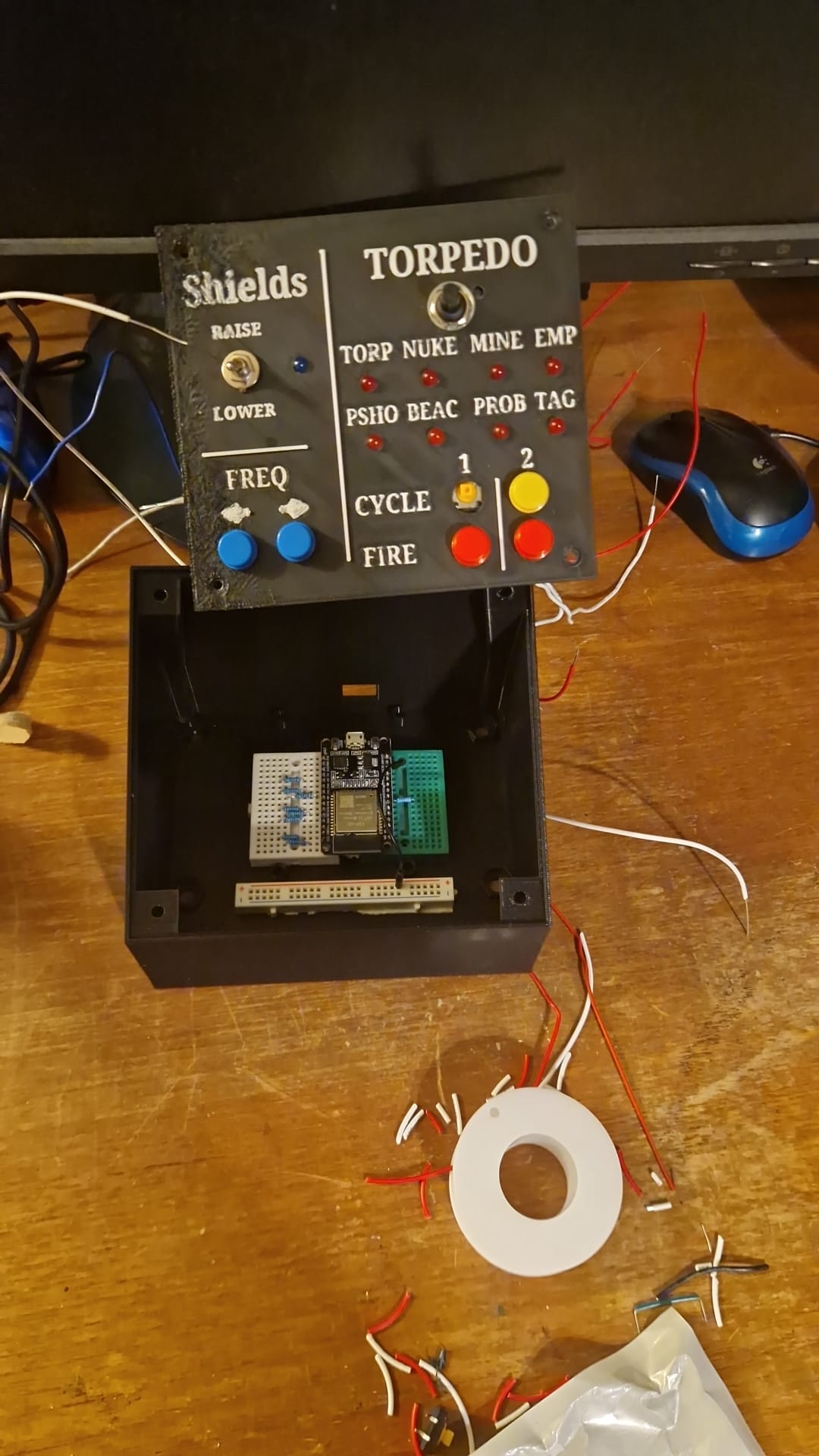
Control Panel Build